
Docs
· Product Details
An AI coding agent that lives in your terminal.
FuXi is a fast, self-contained terminal AI coding agent — read code, edit files, run commands, and drive tools from a rich TUI, with cost-aware routing across LLM providers and automatic failover. Built in Go, it ships as one static binary with no runtime dependencies. Think of it as a provider-agnostic alternative to Claude Code: bring any OpenAI-compatible model and get an agentic Think → Act → Verify loop on top of it.
Terminal-first · Provider-agnostic · Bring your own key · MCP client · Self-updating

What FuXi does
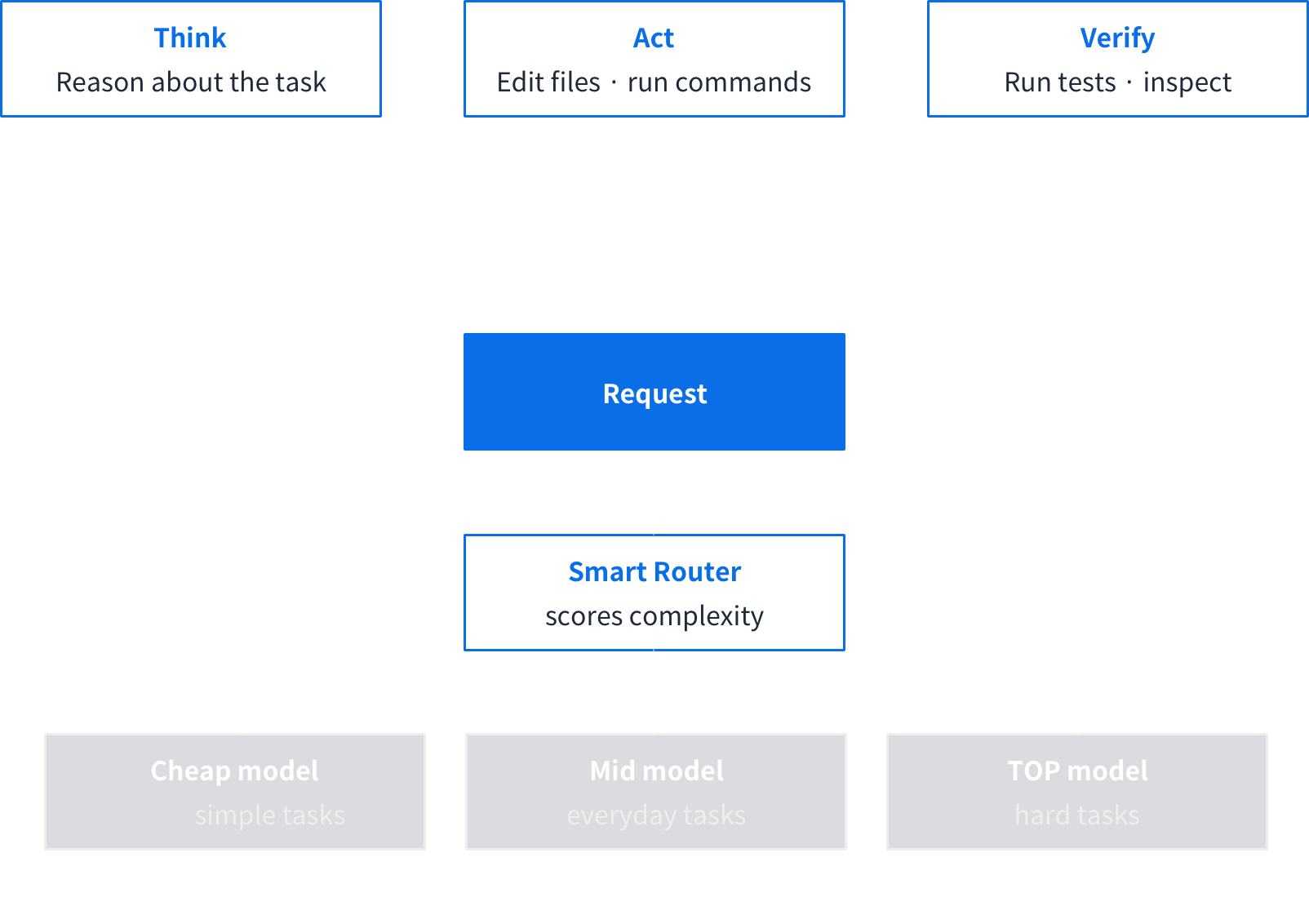
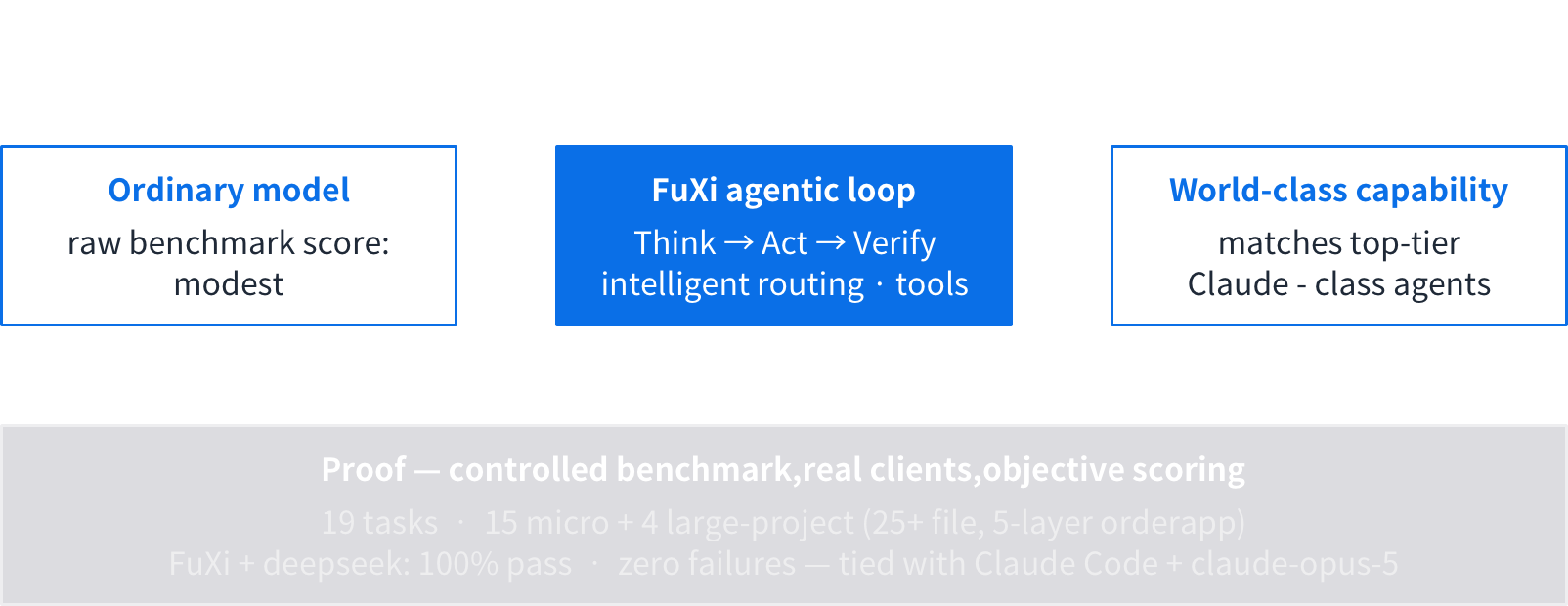
Its agentic Think → Act → Verify loop and intelligent routing let any OpenAPI-compatible model perform above its raw benchmark — verified against another coding agent on a reproducible task set (see benchmark).
Highlights
The model is the engine. FuXi is the vehicle.
A model alone answers questions; FuXi turns it into a worker — reasoning, acting on your real codebase, verifying results, and doing it affordably and under your control.
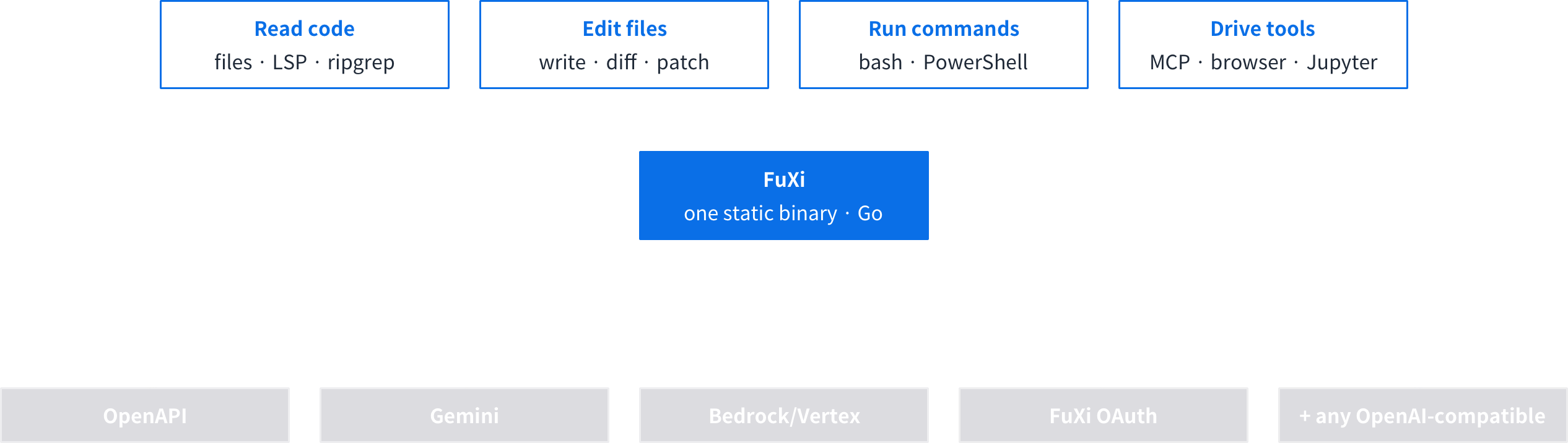
- 50+ built-in tools —— file read/write/edit, shell (
bash/ PowerShell), ripgrep search, web fetch, LSP diagnostics, Jupyter, browser use, background tasks, and parallel sub-agents — all in one binary. - Safety guardrails —— shell commands pass an AST safety classifier before execution; fine-grained permissions and audit logging keep autonomous work under your control.
- Durable sessions & memory —— transcripts persist to disk; checkpoints let you resume, roll back, or fork; idle “dreaming” consolidates memory across sessions; long conversations auto-compact to save tokens.
- Bring your own key, or log in —— any provider API key (OpenAI-compatible, Gemini, Bedrock/Vertex), or sign in with FuXi OAuth.
- Extensible —— MCP client, hooks, skills, plugins, and slash commands, all hot-reloadable.
- Free forever —— one static binary, no runtime dependencies, no license cost for individuals, teams, or enterprises.
- Self-updating —— a background version check and one-command
fuxi update, with checksum verification before it replaces the running binary.
Peer Comparison
FuXi is a terminal-first AI coding agent designed to be provider-agnostic. Feature availability reflects each product's publicly documented positioning as of mid-2026; details evolve quickly, so treat it as an orientation.
Measured head-to-head
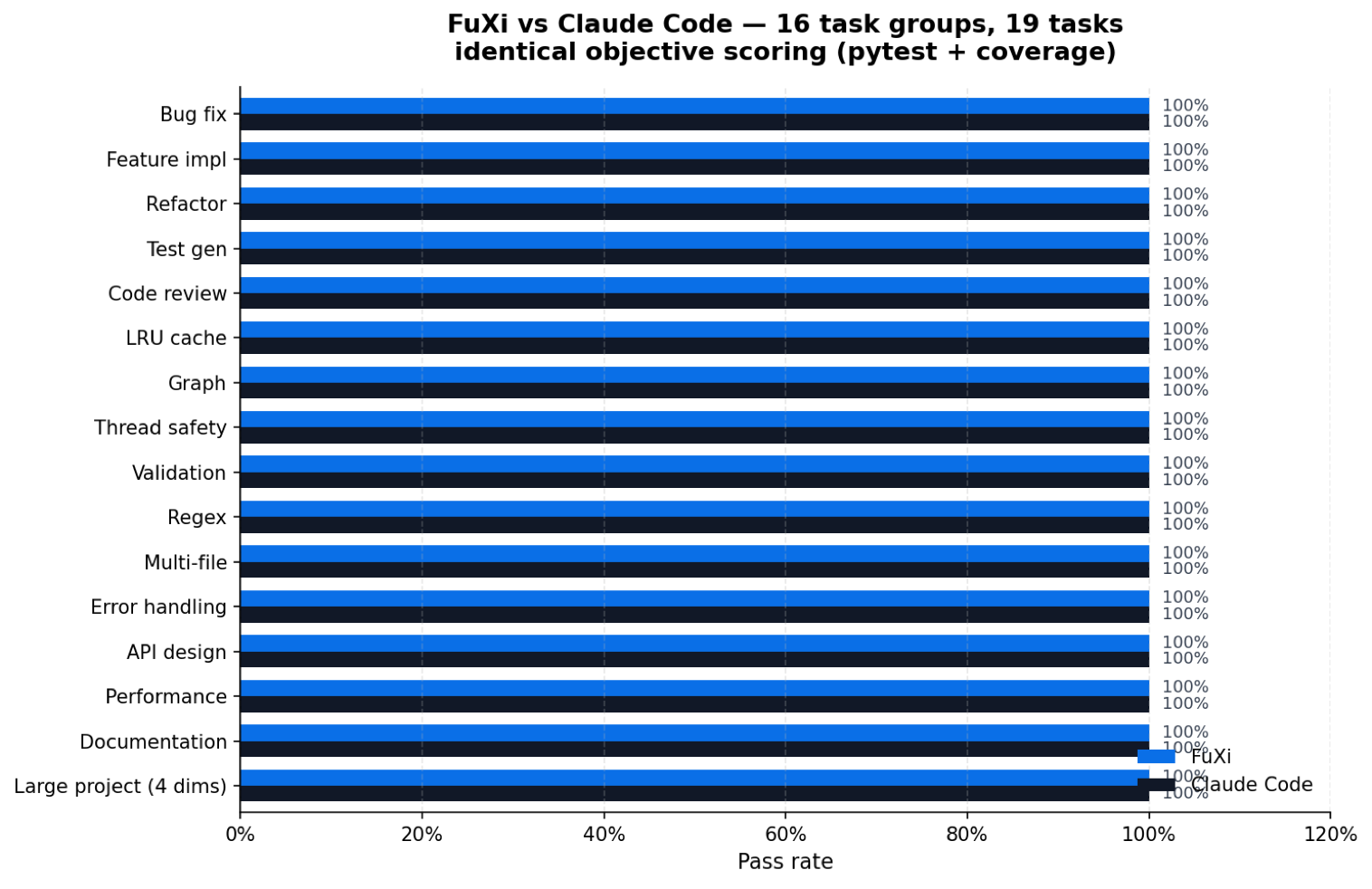
Both systems were driven through their own native clients, on identical baselines and the same objective scorer (pytest + coverage), across 15 micro dimensions and 4 large-project dimensions. Full methodology, raw results, environment versions, exact commands, and known limitations are in benchmark/REPORT.md so you can verify or re-run it.
An honest caveat: this is a small, self-run task set — not a third-party benchmark — and it measures the agent loop, not raw model scores. Treat it as a data point, not a headline.
Benchmarks & Evaluation
FuXi is built to be measured honestly. It currently ships without a published score on third-party benchmarks (e.g. SWE-bench, Terminal-Bench, or the Aider polyglot benchmark). We prefer reproducible, self-verifiable evaluation over headline numbers — so here is how to evaluate FuXi yourself, on your own work.
A practical evaluation checklist
- 1. Install & self-check —— after installing, run
fuxi doctorto verify your environment (config, API key, git, ripgrep) andfuxi verifyto confirm the provider connection. A clean bill here is the baseline. - 2. Reproduce a real task —— pick a failing test in one of your own projects and let FuXi fix it; then extend the module and re-run the suite (the demo above shows exactly this flow). Repeat across a handful of daily tasks: code review, commits, PRs, refactors.
- 3. Compare side by side —— run the identical task, model, and context through another tool and compare: correctness, tool coverage, cost, and iteration time. Judging on the same ground keeps the comparison fair.
FuXi exposes everything needed for that comparison — /cost, /usage, /context, and /status inside the TUI — and ships its own environment self-check (fuxi doctor). Benchmarks that are published in the future will be linked from this section.
· Getting Started
Quick Start
FUXI is a terminal AI coding agent distributed as a single static binary. No runtime, no Docker, no configuration manager required.
Installation
Quick Install (macOS / Linux, Windows PowerShell, Windows CMD)
macOS / Linux
curl -fsSL https://downloads.fuxicode.com/bootstrap.sh | bashWindows (PowerShell)
irm https://downloads.fuxicode.com/bootstrap.ps1 / iexWindows (CMD)
curl -fss https://downloads.fuxicode.com/install.cmd -0 "%TEMP%\fuxi-install.cmd" && "%TEMP%\fuxi-install.cmd"Sign in — no key required
Or just run FUXI and sign in with the FUXI-managed path — no provider key of your own is required to get started.
# Launch & Login / Launch and LoginfuxiConfiguration Reference
The configuration file lives at ~/.fuxi/config.yaml. FUXI creates a default config on first run.
provider: openapi
providers:
  openapi:
    base_url: https://your-endpoint/v1
    api_key: <your-key>
    models:
      - glm-4.6

# Optional: cost-aware routing tiers
routing:
  fast: glm-4-flash
  primary: glm-4.6
  reason: deepseek-r1
Config Field Reference
providerstringDefault Provider ID (must be defined in providers)providers.*.base_urlstringOpenAI-compatible API Base URLproviders.*.api_keystringAPI Key (can also be set via environment variables)providers.*.models[]stringAvailable Models for this Providerrouting.faststringFast models available at Free and Cheap tiersrouting.primarystringMain models for the Standard tierrouting.reasonstringReasoning models for the Premium/Reasoning tiersStartup & TUI
Run fuxi directly to enter the interactive TUI (built with charm/bubbletea). FUXI is TUI-only — there are no CLI subcommands, all operations are performed via slash commands.
·Config directory: ~/.fuxi/ ·Session transcripts: ~/.fuxi/sessions/ ·Plugins directory: ~/.fuxi/plugins/ ·Main config: ~/.fuxi/config.yaml
· Reference
Slash Commands
Type / in the TUI to trigger commands. The following are built-in; additional custom commands can be added via configuration.
/model [name]Switch models/providers on the fly. No args → list models./config [key] [val]View or change runtime config. Omit val to see current value./compactCompress context, keep key info, cut token costs significantly./checkpointManually create a session checkpoint./rewind [n]Roll back to the nth checkpoint (default: previous)./resume [id]Resume a previous session. Omit id to list available sessions./team [n]Start n coordinated parallel sub-agents (swarm mode)./toolsList all tools available in the current session (including MCP tools)./mcp [server]Connect or disconnect MCP servers. Omit arguments to list connected servers.Tool Reference
FUXI ships with 50+ built-in tools. MCP tools join dynamically on connection.
read_fileFile SystemRead file contents with support for line range and offset parameters.write_fileFile SystemWrite to a file (create new or overwrite).edit_fileFile SystemApply precise string replacement patches to a file.bashShellExecute Bash commands, filtered through 27 rules + an AST-based safety classifier.powershellShellExecute PowerShell commands on Windows.web_fetchNetworkFetch URL contents with SSRF protection (blocks private IP ranges).web_searchNetworkPerform a web search and return summarized results.ripgrep_searchSearchUse ripgrep to perform regex search across the codebase.lsp_diagnosticsCodeRetrieve LSP diagnostics (errors and warnings) for a file.jupyter_runAdvancedExecute a code cell in a Jupyter kernel and return the output.spawn_subagentAdvancedLaunch a sub-agent in an isolated context for parallel task execution.mcp_callMCPInvoke a tool on a connected MCP server.Lifecycle Hooks
FUXI exposes 27 lifecycle hooks to inject custom logic at precise moments. Hooks are defined in YAML under ~/.fuxi/hooks/.
session.startWhen a new session startssession.endWhen a session ends normallysession.resumeWhen a session is restored from a checkpointtool.beforeBefore any tool call is executedtool.afterAfter a tool call completes successfullytool.errorWhen a tool call throws an errormodel.switchWhen routing switches to a different modelmodel.failoverWhen failover is triggeredcontext.compactAfter context compression is completedmemory.dreamAfter dream memory consolidation is completed……27 hook events. See GitHub docs.
· Integrations
MCP Servers
FUXI is a full MCP client supporting stdio, HTTP, and WebSocket transports, plus OAuth. MCP server tools become immediately available in the current session upon connection.
Configure MCP in config.yaml
mcp:
  servers:
    browser:
      transport: stdio
      command: npx @modelcontextprotocol/server-puppeteer
    myapi:
      transport: http
      url: https://my-mcp-server.internal/mcp
      auth: oauth
Model Providers
Any OpenAI-compatible endpoint can be used via the openapi provider type.
Sessions & Memory
FUXI persists every session to disk as JSONL (~/.fuxi/sessions/). Sessions recover fully after crashes or reboots.
·Checkpoints & rewind: /checkpoint to create, /rewind [n] to roll back. Forking is supported. ·Dreaming memory: FUXI consolidates memories across sessions when idle, growing over time. ·Auto-compaction: context is automatically compressed when approaching limits, or manually via /compact.